|
The EGM187 Viewer is a Windows application for setting up the EGM187 device to one of the four available firmware protocols.
After the EGM187 device is configured to either the Profinet IO, Ethernet/IP, EtherCAT or the Modbus TCP firmware protocol, the ongoing cyclic weight data flow for up to four connected LDM64 or LDB151 modules can be viewed and command parameters of the connected modules can be monitored and modified.
The connected modules can also be calibrated by use of the build in calibration dialog.
The EGM187 Viewer Windows application is available in the standard version EGM187 Viewer having a base font of 8 and in a large version EGM187 Viewer L having a base font of 12. The two versions can be installed independently of each other.
If you use the Profinet IO or the EtherCAT interface, it’s important that a packet capture program called Npcap is installed on your computer.
You can find the installer for the Npcap on the site map “nmap.org/npcap/”.
When you run the Profinet Viewer for the very first time and you get a Windows secure dialog, then please accept it. You will then get the error message “Couldn’t connect to device: No response received”. Press “OK” and please reselect the device by pressing the “Select Device” Button again. Or simply exit and restart the Profinet Viewer.
|
|
|

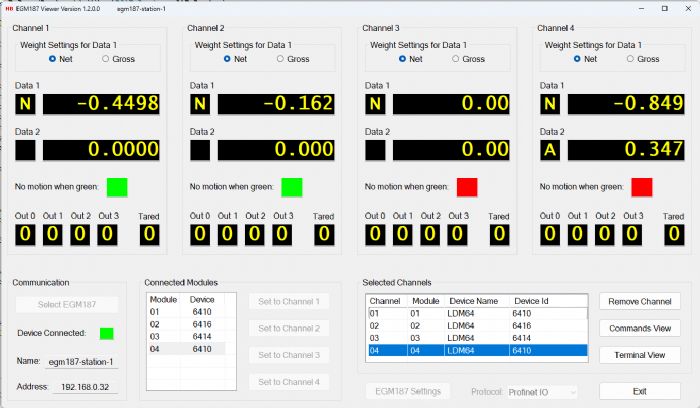
 EGM187 Viewer version 1.2.0.0
 EGM187 Viewer Users Manual